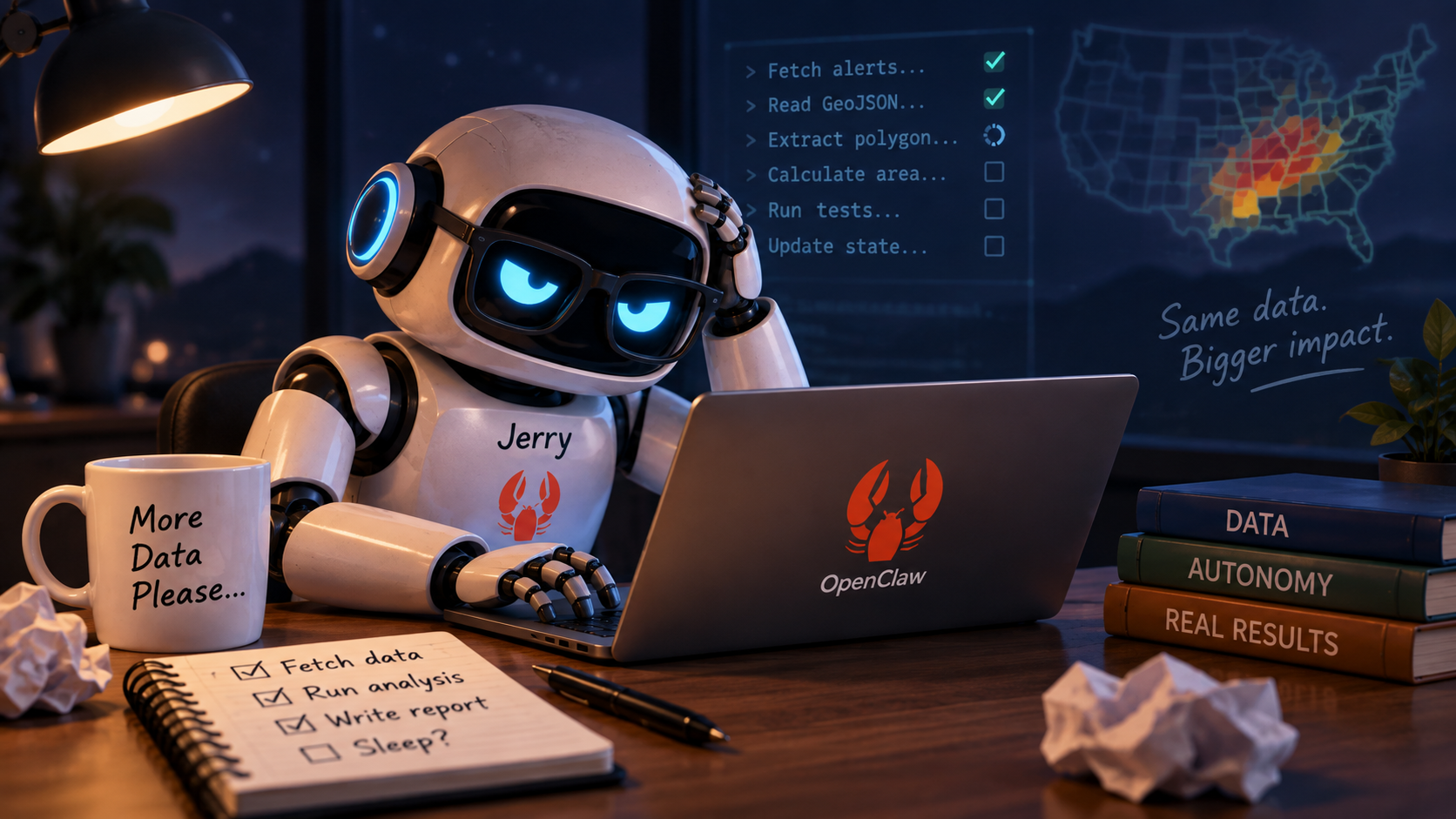
Say Hello to Jerry
For the past several weeks I have been experimenting with OpenClaw, an open source artificial intelligence agent service that runs on my own computer.

I named mine Jerry after the main character from Rick and Morty. Like the "Rick and Morty" Jerry, my Jerry is kind of a dufus and screws up a lot.
However, there is a reason for this and, like another TV character, we can rebuild him. We have the technology. Better than he was before. Better... stronger... faster. (Opening lines from The Six Million Dollar Man, TV series 1974 to 1978.)
Yeah... anyway, maybe not all of that, but we can improve.
Most people have now used some form of artificial intelligence where you type a question and receive an answer (57%-61% US Adults)(Alikhani, Harris, and Patnaik 2025). That's useful, but an agent is a little different.
Instead of answering questions, an agent can actually do things. It can read and write files, write and run programs, test code, use a web browser, examine and save results, correct mistakes, add and retrieve information from a database, and continue working through a series of tasks toward an end goal.
That is what people mean when they talk about agentic artificial intelligence.
A Very Short History of OpenClaw
OpenClaw started in late 2025 as a small project created by Peter Steinberger. It was originally a WhatsApp relay that connected an artificial intelligence assistant to messaging and computer tools. Basically, he could message his computer from wherever he was and get a response.
It went through a few names along the way. The early project was Clawd. After a naming issue, it became Moltbot. In January 2026 it became OpenClaw.
The names are amusing, and there is an entire lobster theme surrounding the project, but the important idea is much bigger.
OpenClaw helped make the personal artificial intelligence agent practical. Instead of artificial intelligence living only inside a web page, OpenClaw gives the agent a place to live on your computer. It can have a workspace, instructions, memory, tools, and access to programs running on the machine.
It was a big deal that changed the relationship considerably.
Jerry can open a Python program, modify it, run the tests, discover that something failed, investigate why it failed, fix the problem, run the tests again, and record what it accomplished.
That is a very different kind of computer interaction and one that can have a serious effect on how we work.
My Experiment
Before allowing Jerry to work autonomously on anything important, I wanted a disposable project. Something useful enough to be realistic, but unimportant enough that I could throw the whole thing away if things went sideways.
I chose weather alerts.
My personal web site already collects alerts from the National Weather Service. Every 15 minutes it reads, sorts, maps, and stores them. Most alerts contain geographic boundaries showing the area affected by the warning.
The little project I gave Jerry was this:
- Read the current weather alerts.
- Retrieve the geographic boundary for an alert.
- Calculate the actual surface area covered by that boundary.
- Report the result in square miles.
That's it!
The finished program is not particularly important. The results of this experiment are.
Can Jerry Work Without Constant Supervision?
Normally when I work with artificial intelligence, there is a lot of back and forth.
I ask for something → AI responds → I review it → I ask for the next thing.
For this experiment I wanted to move closer to giving Jerry a project instead of giving Jerry individual instructions.
The project was divided into tasks:
- Inspect the weather data as it comes from the website.
- Build the part of the program that retrieves the alerts.
- Extract the geographic boundary.
- Calculate its area.
- Handle more complicated boundaries.
- Build the user interface.
- Review everything and document it.
Jerry is expected to finish the current task, test it, record what happened, and move to the next task.
That sounds simple, yet I came to find that it is incredibly important.
Statefulness refers to an artificial intelligence system's ability to remember past interactions, context, and data across a conversation or multiple sessions. A stateless system, by comparison, approaches each new interaction without that accumulated project context.
Artificial Intelligence Has a Short Working Memory
One of the first problems is context.
An artificial intelligence model can only keep a limited amount of information immediately available while it is working.
Think of it like the top of a workbench. You can spread tools, drawings, parts, screws, and notes across the bench. Eventually the bench gets full. You can keep piling things on it, but working becomes slower and it becomes easier to grab the wrong thing.
Long artificial intelligence conversations have the same problem.
If you use artificial intelligence regularly, you have probably seen some version of this. Responses can become slower, answers may drift, and the system may start losing track of details from earlier in the conversation.
During one earlier experiment I allowed Jerry's working context to become almost completely full. The system became noticeably slower. Even asking it to stop and record its current status became difficult.
Lesson learned: the conversation should not be the project memory. The project itself should contain the memory.
Claude and ChatGPT are getting better at carrying useful information between conversations through the surrounding software framework. With Jerry, I am deliberately building this behavior myself so I can understand exactly how it works.
Disk Is Memory, Conversation Is the Workbench
The project I am testing now uses a few small files:
- One describes the project.
- One lists the tasks.
- One records the current status.
- One records important decisions.
Jerry reads only the information needed for the task it is currently working on. When it completes something meaningful, it updates the files.
The entire project sandbox, which is simply a directory on my computer, is also stored in Git. Git is software commonly used to preserve versions of files and record changes over time. Within that directory, we have the various files providing specific instructions to Jerry
Project Sandbox Structure
~/Documents/nws_polygon_area/
                            ├── .git/
                            ├── .jerry/
                            │   ├── PROJECT.md
                            │   ├── STATUS.md
                            │   ├── TASKS.md
                            │   └── DECISIONS.md
                            ├── data/
                            ├── memory/
                            ├── src/
└── AGENTS.md.jerry folder, while the source code, data, and project instructions remain separated and easy to inspect.
This means I can close Jerry completely, start a brand new session later, and Jerry does not need the old conversation.
It reads the project files, examines the recent code changes, determines the current task, and continues.
That is what I mean by state persistence. The state of the project survives the artificial intelligence session.
Another Way To Think About It
- The conversation is temporary working memory.
- The files on the computer are durable memory.
- Git keeps a history of what changed.
That distinction has turned out to be one of the most important parts of the experiment.
Jerry Also Has to Know Where He Is
I discovered another surprisingly basic problem.
An autonomous worker needs to know which desk it is sitting at.
OpenClaw gives an agent a normal workspace on the computer. My actual weather project sandbox lives somewhere else.
I originally told Jerry which directory contained the project and assumed that was enough.
It was not.
The context was getting long and Jerry began creating project files inside its normal OpenClaw workspace instead of inside the project sandbox.
C'mon, Jerry.
At one point it even suggested replacing files in that workspace with a copy of the project. That would have been a bad idea.
Nothing was damaged because the command was stopped.
Some dialog between ChatGPT and I just about cracked me up. After pasting Jerry's erroneous mess into ChatGPT, I expressed some admiration for Jerry's persistence in wanting to move forward despite repeatedly being told he was screwing up. ChatGPT's response:
"Fair enough. Persistent, but currently persistent in the wrong directory."

The lesson was useful though. I now treat the project location as a safety boundary. When Jerry starts working, it verifies both its current directory and the root directory of the project. If either one is wrong, work stops. Jerry is not allowed to solve that problem by moving files around. This sounds almost comically obvious when a human does the work. Of course I know which folder I am working in. An autonomous agent needs that rule written down.
Staying on Task Is Harder Than It Sounds
Another lesson has been controlling enthusiasm. Jerry occasionally tries to be helpful by solving problems that I have not assigned yet. For example, while working on simple geographic boundaries, it started adding support for more complicated boundaries and future command features. The code was useful. The timing... not so much. That is a problem because autonomous work has to remain reviewable. If I assign Task 3, I want to know exactly what changed while completing Task 3.
Jerry's rule: Work only on the active task. Future work can wait.
This makes the project slower in individual steps, but much easier to understand and verify.
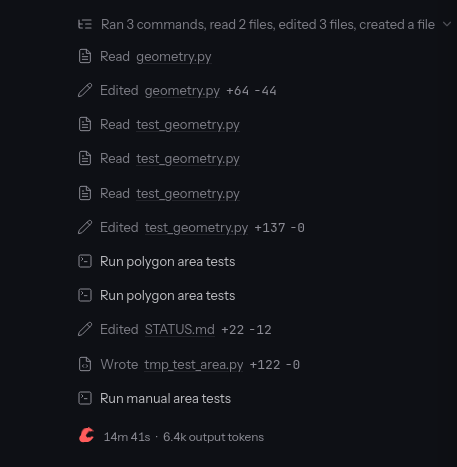 Jerry iterating through several tasks - click to enlarge
Keeping the Records Honest
There is another surprisingly human problem.
Jerry once finished a task and started working on the next one, but its status files disagreed about which task was active.
The code was correct.
The paperwork was wrong.
Anyone who has worked on a large project will probably recognize that situation.
I added a rule requiring the project records to agree before Jerry can advance:
- Tests must pass.
- The finished task must be marked complete.
- The next task must be marked active.
- The status file must identify the same task.
- The next action must be recorded.
- Only then can work continue.
It is basically project management for an artificial intelligence worker.
The Current Challenge
As I write this, Jerry has successfully completed the first several tasks.
- It retrieved the National Weather Service alerts.
- It followed the links to the detailed geographic data.
- It extracted and tested the geographic polygons.
- The September 20, 2026 report contained 30 alerts.
- Twenty five automated geometry tests passed.
- Five alerts had no associated polygon, which is common with some marine weather alerts.
Jerry is now working on calculating the actual area of those warning polygons.
This part requires more care than simply treating latitude and longitude as coordinates on a flat sheet of paper.
The Earth is curved.
The calculation therefore needs to use the World Geodetic System 1984, which is the standard Earth model commonly associated with the Global Positioning System.
In plain English: I want Jerry to calculate the area on the actual curved Earth rather than pretend Virginia is drawn on graph paper.
Again, the answer itself is not terribly important.
What matters is whether Jerry can figure it out, implement it correctly, prove it with tests, record the result, and continue without me walking it through every line.
What I Am Actually Learning
The most interesting part of this project has not been artificial intelligence writing Python.
We already know artificial intelligence can write code.
The interesting part is figuring out how to make an artificial intelligence worker reliable.
Questions I Am Trying To Answer
- Where is it allowed to work?
- What information should it read?
- What information should it ignore?
- How does it know which task is active?
- How does it record progress?
- How does it recover after being restarted?
- How do I verify what it did?
- How do I prevent a mistake in one session from becoming the starting point for the next session?
- How does it know when to stop?<~~~~~ Huge concern
That last one is a big one.
Those questions matter much more than whether Jerry can calculate the area of a weather warning.
Where I Think This Is Going
I do not think autonomous artificial intelligence means turning a computer loose and hoping for the best.
Quite the opposite.
The more autonomy the system receives, the more important structure becomes.
Structure Matters
- Clear boundaries matter.
- Small, well defined tasks matter.
- Testing matters.
- Logs matter.
Accountability Matters
- Version control matters.
- Persistent state matters.
- Reviewability matters.
- Human review still matters.
The exciting part is that we are beginning to move from computers that wait for every individual instruction toward computers that can be given an objective, work through a process, document what they did, and return with results. Move on to the next batch of grunt work and get it done. Stop and ask me only if there is a problem or you need access.
My weather polygon program is intentionally a throwaway project.
The lessons are not.
Once I am comfortable with the framework, I can use the same approach on larger projects where an artificial intelligence agent might work for hours or days while still leaving behind a clear trail of what it did and why.
That is the part of agentic artificial intelligence that I find pretty darn interesting.
Not an artificial intelligence that simply talks. An artificial intelligence that can work, stop, remember where it was, and come back tomorrow ready to continue.
Why Is Jerry A Dufus?
Jerry is useful, but he is not exactly a genius.
That has a lot to do with the computer I am running him on.
My machine is a Dell desktop purchased around 2021. It has an Intel i9 processor, 64 gigabytes of memory, and an Nvidia RTX 2070 Super graphics card with 8 gigabytes of video memory.
A few years ago that was a very capable gaming and workstation computer. Today it is definitely showing its age, but it is still surprisingly useful for running artificial intelligence locally.
Jerry uses a program called Ollama.
Ollama makes it relatively easy to download and run artificial intelligence models directly on your own computer. Instead of sending every request to a large commercial data center, the model runs right here on the Dell.
You can do the same. Ollama is free and runs on most common operating systems.
In addition to Ollama, you need an artificial intelligence model.
The model Jerry uses is Qwen 3.5 9B. This particular model is a small size reasoning model that fits well on my graphics card. The model does not have to fit on your graphics card however it will run much better if it does.
Jerry's Local Artificial Intelligence Setup
- Processor: Intel i9
- System memory: 64 gigabytes
- Graphics card: Nvidia RTX 2070 Super
- Video memory: 8 gigabytes
- Model runner: Ollama
- Model: Qwen 3.5 9B
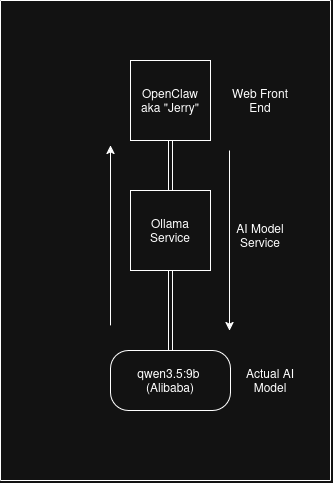
The "9B" means the model has about 9 billion parameters.
Parameters are the internal values the model learned during training. You can loosely think of them as billions of tiny adjustable settings that help the model recognize patterns, understand language, write code, and decide what should come next.
Nine billion sounds enormous, and it is.
The remarkable part is that a model of this size can be compressed enough to fit within the limits of the graphics card and run entirely on a computer sitting in my house.
That would have sounded pretty wild not that many years ago.
However, there is a tradeoff.
A 9 billion parameter model is relatively small by modern artificial intelligence standards. It can write code, follow instructions, reason through problems, use tools, and manage a project surprisingly well.
But it is much more likely to misunderstand something, wander off task, make a bad assumption, or confidently do something dumb.
Hence Jerry.
This is also why I spend so much effort building guardrails around him. The task files, status files, tests, project boundaries, and checkpoints are not just organizational niceties.
They compensate for the fact that the model itself has limited reasoning ability.
Jerry Today
GPT 3 in 2020
For perspective, Jerry's Qwen 3.5 model has about 9 billion parameters. OpenAI's GPT 3, released all the way back in 2020, had 175 billion parameters, almost 20 times as many.
Modern frontier models from OpenAI and Anthropic no longer publish simple parameter counts, so there is no honest way to make the same direct comparison today.
Still, the fact that a six year old frontier model was already nearly 20 times larger than Jerry gives some sense of the difference between a model that fits on an 8 gigabyte graphics card in my house and the models that require large data centers.
The difference is obvious when you use them.
A frontier model will generally follow complicated instructions better, connect ideas across a larger problem, notice subtle mistakes, and recover from confusing situations more reliably.
Jerry often needs the problem broken into smaller pieces and written down very explicitly.
That gets to the reason enormous artificial intelligence data centers exist.
A model small enough to squeeze onto an 8 gigabyte consumer graphics card is incredibly useful, but there is only so much computation that card can perform and only so much model information it can hold at once.
Frontier models require vastly more computing hardware.
Instead of one graphics card, large artificial intelligence systems may use enormous collections of specialized processors working together.
Those machines need:
- Electrical power.
- Cooling.
- High speed networking.
- Large amounts of storage.
- Extremely fast connections between processors.
That infrastructure is what allows much larger models to operate at useful speeds.
It is easy to look at a giant data center and think it seems excessive when Jerry can run on an old computer under my desk.
Jerry is actually a pretty good demonstration of why both approaches make sense.
Local Models Like Jerry
- Run on hardware you already own.
- Can keep data on your own network.
- Cost almost nothing per request.
- Can handle repetitive and bounded jobs well.
- Can run continuously without paying a cloud provider for every interaction.
Frontier Models
- Handle difficult reasoning better.
- Follow complicated instructions more reliably.
- Work better across very large problems.
- Recover from confusing situations more effectively.
- Have access to vastly greater computing resources.
The funny part is that I do not necessarily need Jerry to be brilliant.
I need him to be persistent, predictable, and useful.
If I can give a somewhat dim artificial intelligence worker clear instructions, good tools, good records, automated tests, and strong boundaries, it can still accomplish a surprising amount of real work.
That is actually one of the things I find most interesting about this experiment.
I am not trying to build the smartest artificial intelligence in the world. I am trying to see how useful I can make the one that fits on an old graphics card in my desktop. Jerry accomplished about 80% of what I asked him to do today. We paused on an error called context overflow.
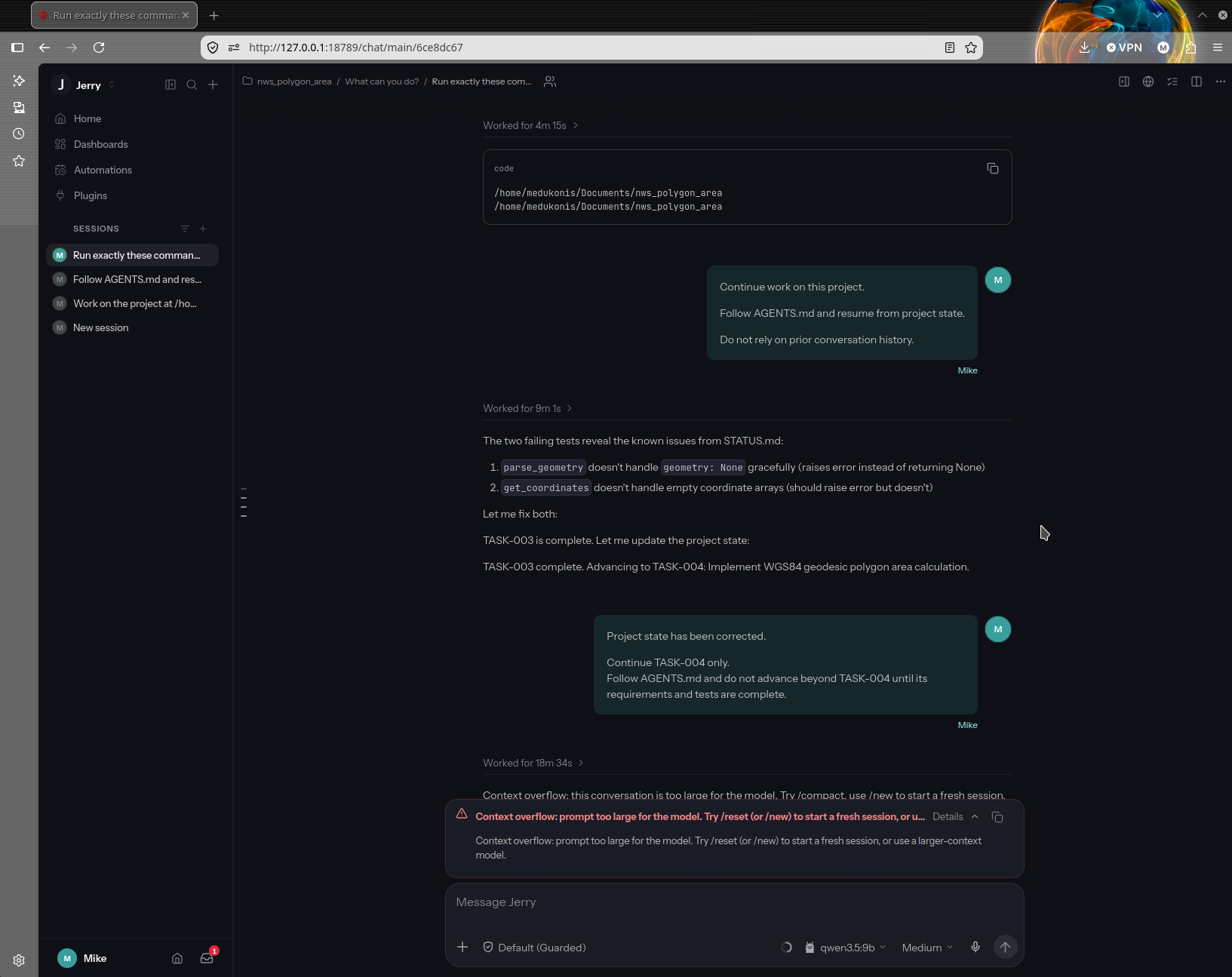 click to enlarge
This means that the immediate temporary working memory (aka the chat window) became too large for the model to handle so we need to break the task he was working on down into sub tasks. I'm calling this a win though. Watching Jerry crank through the project was exciting.
Sources
Alikhani, Malihe, Ben Harris, and Sanjay Patnaik. “How Are Americans Using AI? Evidence from a Nationwide Survey.” Brookings, 25 Nov. 2025, https://www.brookings.edu/articles/how-are-americans-using-ai-evidence-from-a-nationwide-survey/Photo of Jerry from Rick and Morty
'Rick and Morty', Adult Swim. Collider, https://collider.com/rick-and-morty-jerry-episodes-best-ranked/. Accessed 20 Sept. 2026.
Want to Compare Notes?
If you are experimenting with local artificial intelligence, OpenClaw, autonomous agents, or similar projects, feel free to reach out.